The Big Picture
Map the 8 architecture layers and understand how a single user message travels from your terminal to the API and back.
Why This Lesson Matters
Claude Code is not a simple chatbot wrapper. It's a full-stack agent runtime that runs in your terminal. Before you can build your own agents, you need a mental model of how the whole thing fits together.
This lesson gives you that map — the 8 layers, the entry points, and how data flows from your keypress to an API call and back to rendered text in your terminal.
Think of it like learning a city's subway map before you start navigating it. You don't need to know every station. You just need to know the main lines.
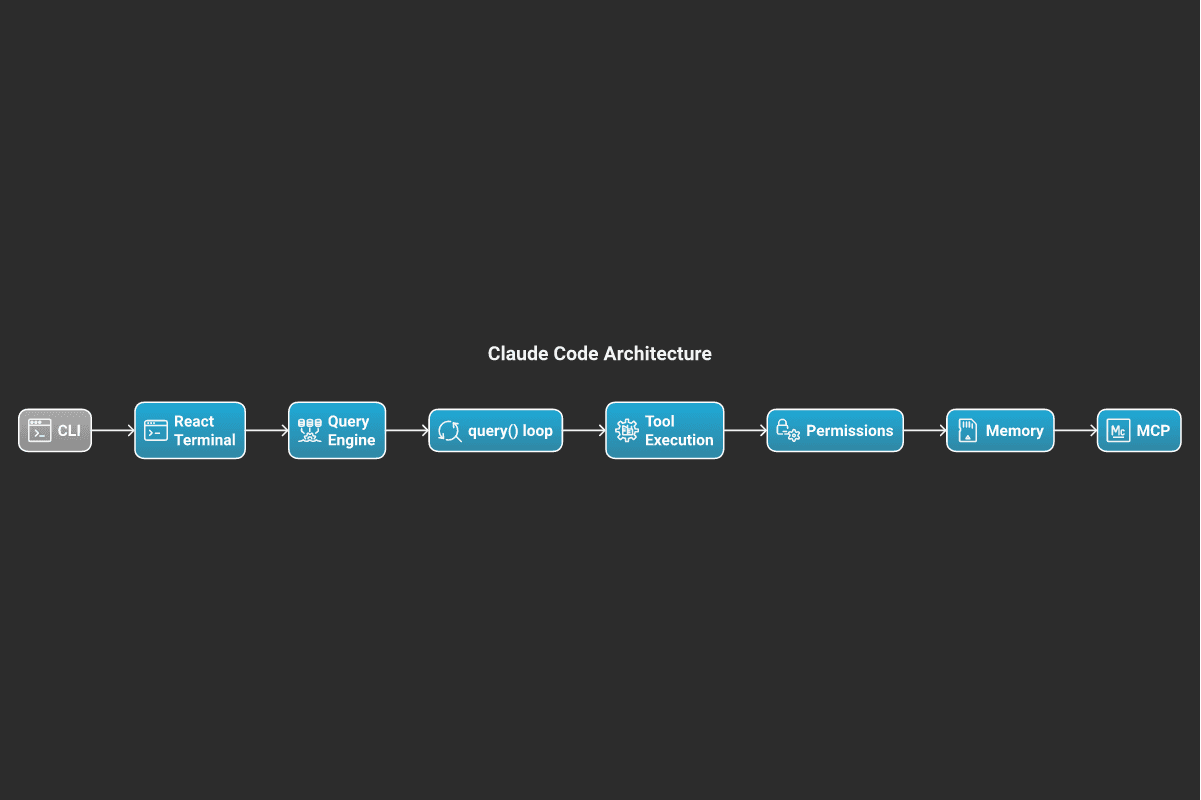
Layer 1: The CLI Entry Point
Everything starts at cli.py. When you run claude, this is the first file executed. It does three things:
- Detects the execution mode — are we in interactive REPL mode, one-shot
-pmode, or bridge/IDE mode? - Handles immediate exits — version flags (
--version,-v,-V) exit before anything else starts. - Delegates — it calls into
main.pywith a structured config object.
The key insight: the CLI layer is intentionally thin. It's just a router. No business logic lives here.
Layer 2: React in the Terminal
This is one of Claude Code's most surprising architectural choices. The entire UI is built with React — but rendered to a terminal, not a DOM.
The source at src/ink/ is a fully custom terminal renderer. It's not the third-party "Ink" library. It includes:
- A custom React reconciler (so React's
useState,useEffect, etc. all work) - Integration with Yoga layout engine (flexbox in your terminal!)
- A screen buffer that diffs and redraws only changed cells
Why React? Possible reason (speculation): The team likely wanted to manage complex, dynamic UI state — streaming text, tool progress indicators, multiple concurrent operations — without building a bespoke state machine. React's declarative model maps well to "what should the screen look like given this state."
Layer 3: The Query Engine
query_engine.py is the conversation manager. It holds the message history for a session and serializes concurrent user actions into a single queue.
Its central method is submitMessage() which:
1. Adds the user message to the history
2. Notifies the UI (React re-renders the optimistic state)
3. Calls into query() — the actual API layer
The QueryEngine is also where skill discovery happens. When Claude responds with tool calls to skills it has learned, the engine tracks them to avoid unbounded growth in the discovered-skills set.
Layer 4: The Tool System
Every capability Claude has beyond text generation — reading files, running bash, searching the web — is a Tool. Each tool implements a strict interface:
name— what Claude calls it in its outputdescription— the system prompt text that teaches Claude when to use itinputSchema— JSON Schema validating the tool's argumentscall()— the actual implementation that runs
Tools are assembled into a pool via assembleToolPool(). The pool is sorted before being sent to the API. This matters for caching: identical tool lists produce identical cache keys, so minor reordering doesn't bust the prompt cache.
Lesson 02 covers the tool system in depth. For now, just know: tools are how Claude acts in the world.
Layer 5: The Permission System
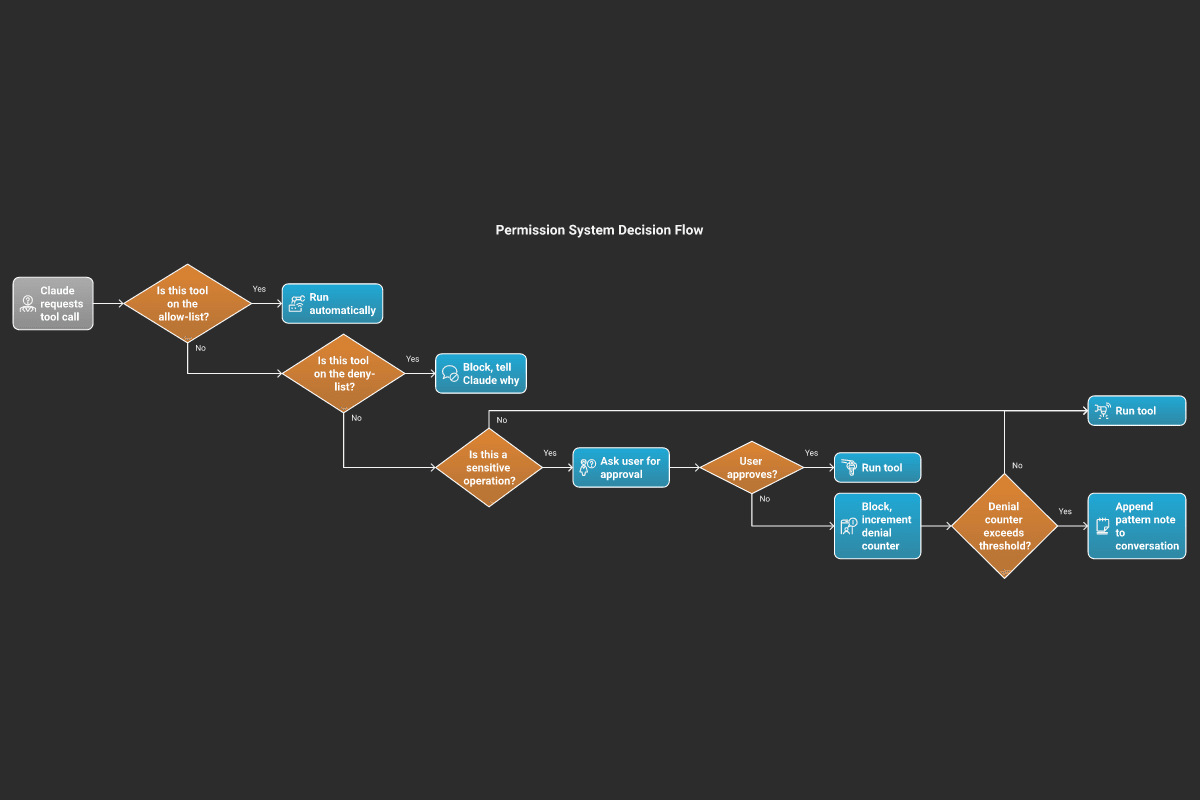
Not all tool calls are created equal. Deleting a file needs different treatment than reading one. Claude Code's permission system sits between "Claude wants to call a tool" and "the tool actually runs."
Three possible outcomes for any tool call: - Allow — proceed automatically (read-only ops, user pre-approved) - Ask — pause and prompt the user for approval - Deny — block and tell Claude why
The system tracks denial counts. After a threshold, repeated denials are noted in the conversation so Claude can understand the pattern and stop trying.
YOLO mode (--dangerously-skip-permissions) bypasses this entirely. The name is intentional.
Layer 6: Memory & Context
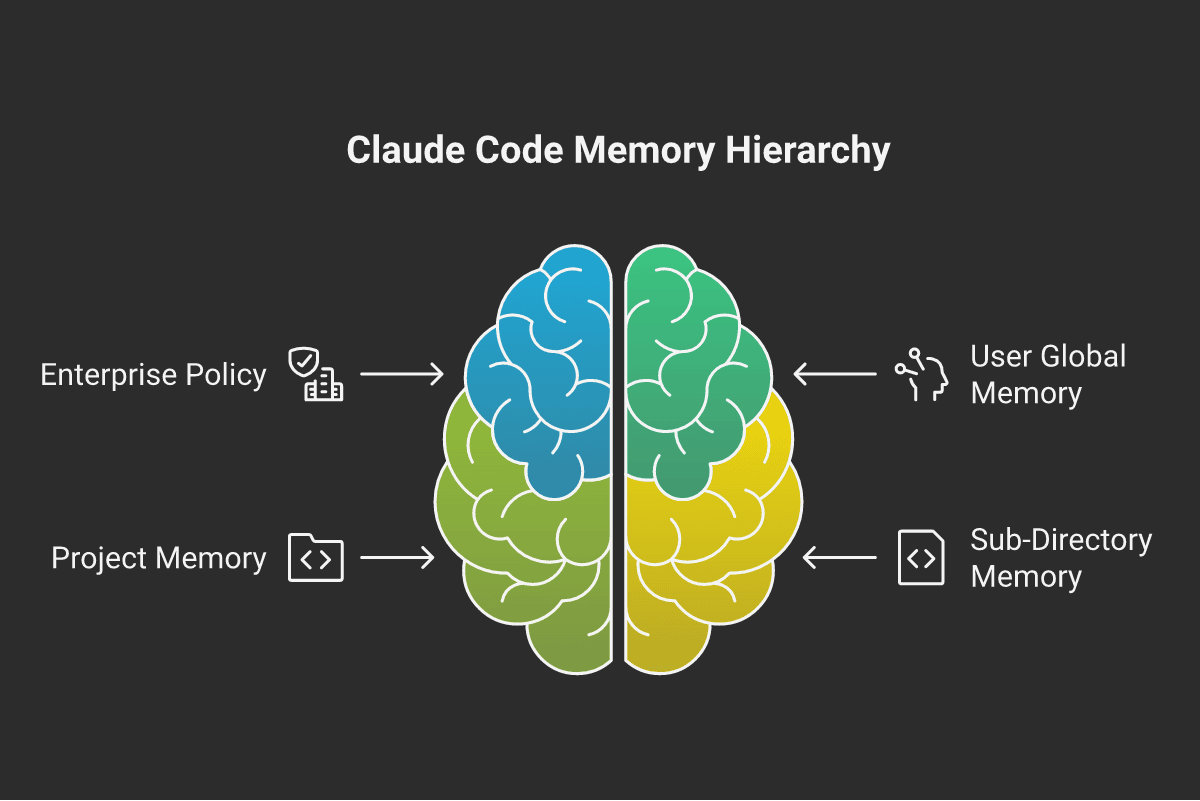
Claude Code has a layered memory system built on a directory hierarchy:
- Enterprise policy —
/Library/Application Support/.claude/ - User global memory —
~/.claude/CLAUDE.md - Project memory —
./CLAUDE.md(and./CLAUDE.local.mdfor gitignored local overrides) - Sub-directory memory —
src/CLAUDE.md,tests/CLAUDE.md, etc.
All applicable files are loaded and concatenated into the system prompt before each conversation turn.
Context compaction is how Claude Code handles long sessions without hitting token limits. When the context window approaches capacity, Claude Code automatically triggers a compaction:
- A secondary Claude call is made with the full conversation history.
- That call produces a concise summary of what happened.
- The raw history is replaced with the summary — freeing thousands of tokens.
- The session continues as normal with the new compressed context.
This is why you sometimes see a "compacting conversation..." message mid-session. The model doesn't lose track of the task — it gets a summary that preserves intent, decisions, and file state. You can also trigger it manually with the /compact command.
Layers 7–8: MCP & Plugins
The final two layers extend the system outward.
MCP (Model Context Protocol) connects Claude Code to external servers that expose tools, resources, and prompts over a standard protocol. You can add MCP servers to your config and they appear as additional tools in Claude's pool. Connections happen over stdio or HTTP/SSE transports.
Plugins are a lighter extensibility mechanism. Skills (like /commit, /review-pr) are loaded from markdown files. Custom commands can be added to .claude/commands/. These extend what Claude can do without the full MCP protocol.
Putting It All Together: One Conversation Turn
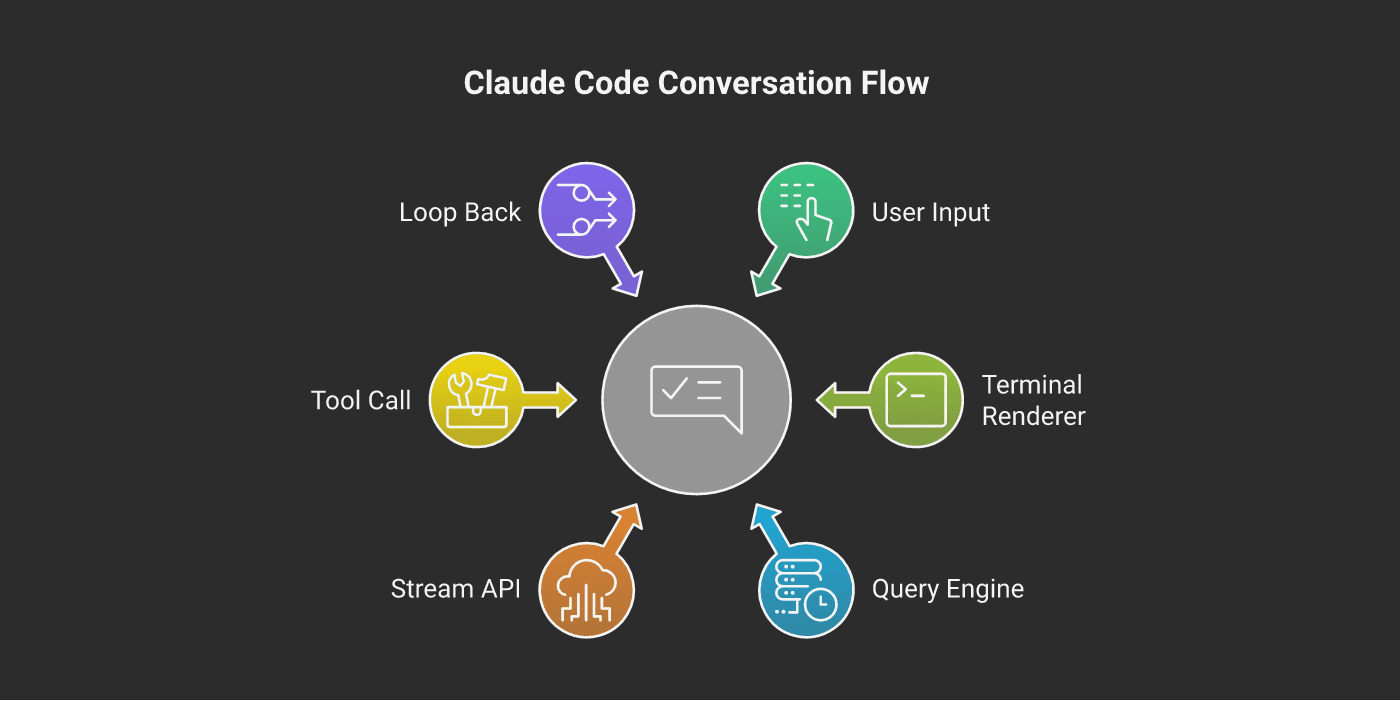
Here's the complete flow when you type a message and press Enter:
- Terminal keypress captured by the renderer (Ink + React)
- React state update —
QueryEngine.submit_message()called - Message added to history, optimistic UI updates immediately
query()called — opens a streaming connection to the Anthropic API- API streams back tokens — each token is rendered to the terminal as it arrives
- If the API returns
tool_useblocks —StreamingToolExecutorintercepts - Permission system checks each tool before it actually runs
- Tool results appended to history — next API call made in the sub-loop
- Steps 6–8 repeat for every tool call in a single turn
- Loop ends when the API returns
stop_reason: "end_turn"
This is why Claude can read a file, run a command, read another file, and write an edit — all before returning control to you. Each tool call is a sub-loop, not a separate conversation turn.
Exercises
-p "prompt"), and version (--version). Exit immediately for the version flag before any other initialization.ScreenBuffer class in Python that only redraws lines which changed between renders.What is a ScreenBuffer? A screen buffer tracks the last rendered frame (as a list of strings, one per line). On each new render, it compares the new lines against the old ones. Lines that haven't changed are skipped — only changed lines trigger a terminal write (using ANSI cursor positioning). This is the same principle as React's virtual DOM diffing, applied to a grid of character cells.
Your class should have:
-
_last_lines: list[str] — internal state storing the previous frame-
render(component, state) -> None — calls the component function, splits output into lines, diffs against _last_lines, and only prints changed lines using \033[{row};0H{line} (ANSI move-cursor escape)- After rendering, update
_last_linesTest it by rendering a 3-line string, then changing only line 2, and asserting that lines 1 and 3 produce no terminal writes.
cli.py (the entry point module) and identify the three execution modes it handles. For each mode, write one sentence describing what it does differently from the others.Tool class, two concrete tools, JSON Schema validation, and a sorted tool pool.What is an input_schema? It's a JSON Schema dict that describes what arguments your tool accepts. The Claude API uses it to know what JSON to generate when calling your tool. It also lets you validate incoming arguments before execution. Example:
{
  "type": "object",
  "properties": {
    "path": { "type": "string", "description": "Absolute file path" }
  },
  "required": ["path"]
}
Your task:
1. Create an abstract
Tool base class with name, description, input_schema (abstract properties) and call(args: dict) (abstract async method). Add a validate(args) method that uses jsonschema.validate().2. Implement
ReadFileTool — reads a file at args["path"] and returns its content as a string.3. Implement
ListDirectoryTool — lists files in args["path"], returns a newline-joined string.4. Write
assemble_tool_pool(tools) -> list[Tool] that sorts tools alphabetically by tool.name (critical for prompt cache stability — the same tool list in the same order = same cache key every time).5. Test by creating both tools, assembling the pool, and asserting the order is
["list_directory", "read_file"].Knowledge Check
5 questions — select an answer, then click "Check answer"
1.What is src/ink/ in the Claude Code codebase?
2.Why does assembleToolPool() sort tools by name before sending them to the API?
3.What triggers a compaction in Claude Code?
4.In a single conversation turn, what happens after Claude returns a tool_use block?
5.What is YOLO mode?